Building Media Literacy in K-5: Teaching Students to Evaluate Reliable Sources

Why Identifying Reliable Information Matters

In today’s digital world, misinformation can spread faster than ever. Eighty-six percent of digital citizens admit they’ve been misled by fake news, and over half of U.S. adults sometimes get their news from social media, where content may be unverified or biased. Young students are particularly at risk—research from Stanford shows that 80% of middle schoolers struggle to tell the difference between ads and real news stories.

With the rapid rise of “fake news” and AI-altered content, teaching young students how to identify reliable sources is a critical component of digital citizenship. Educators have the unique opportunity to lay this foundation, giving students lifelong skills to evaluate information, think critically, and navigate digital spaces responsibly. In this post, we’ll explore practical strategies for K-5 educators to teach students how to distinguish reliable information from falsehoods.

Criteria for Reliable Information Sources

With so much information available at our fingertips, helping students recognize reliable sources is more important—and challenging—than ever. Below are practical criteria to help young students begin developing essential media literacy skills that they can carry with them throughout their education and beyond.

  1. Check for authority and expertise. Encourage students to look for the name and credentials of the author or source. Reputable sources are often affiliated with trusted organizations like universities, government agencies, or established publications. Teach students that authors with specific expertise are more likely to provide accurate information.
  2. Understand the purpose and detect bias. Show students that every piece of information has a purpose—whether it’s to inform, persuade, entertain, or sell. Ask them to consider why a source was created and if it might have a bias. For example, if a website is trying to sell something, it may not present an unbiased perspective. This skill is especially important as students encounter varied sources, from news articles to social media posts.
  3. Look for accuracy and supporting evidence. Reliable sources back up their claims with facts, statistics, and references. Teach students to look for evidence within the text, such as links to credible studies or quotations from experts. Encourage them to ask, “Where does this information come from?” If the source doesn’t cite its claims, it may not be trustworthy.
  4. Check for timeliness. The value of information often depends on how current it is, especially with topics that change frequently, like health or technology. Encourage students to check the publication date of an article or website, as outdated information can sometimes lead to incorrect conclusions, and to prioritize information published in the last few years.
  5. Consider the source’s tone and appearance. Show students that trustworthy websites often have a professional tone and well-organized, error-free content. A site filled with excessive ads, overly dramatic language, or spelling and grammar mistakes often indicates a lack of reliability. While these factors aren’t foolproof, they can help students spot red flags and evaluate sources critically.

Classroom Activity

Bring these tips to life with an activity inspired by the Taito Learning Digital Citizenship Curriculum. Present students with various current news headlines, some of which are “clickbait” and others that are more professional articles based on reliable sources. Ask students to consider why clickbait is used and how it can be misleading.

Next, ask students to recall if they have seen clips on social media that resemble news. Have them brainstorm and list what factors might make a video posted on platforms like YouTube or TikTok an unreliable source of news (e.g., suspicious claims, lack of evidence, the creator’s personal biases and intentions). Explain that, especially on TikTok, many videos present opinions as news or fabricate news.

To extend the activity, select a relevant example of fake news from the content students found. Ask students to work together to analyze how the video’s message is presented. Is it biased? Does it push a specific agenda? Does it use emotional elements to influence the viewer? Discuss these observations as a group.

You can also find an appropriate example of a video showcasing a deepfake. A deepfake is an artificially created or altered image or video where a person’s face or voice is replaced with another using AI. These are used for humorous videos but also for deception. Discuss the potential impact of deepfakes on the reliability of information in the future.

Using these strategies regularly can help students become discerning readers in the digital world, reducing their chances of falling for misinformation. By breaking down the basics of source evaluation, educators can empower students with the skills they need to confidently assess information, even as they encounter increasingly complex media.

Tips for Teaching K-5 Students to Identify Reliable Information Sources

Teaching younger students to evaluate information doesn’t have to be complex. With age-appropriate language and interactive activities, educators can help K-5 students build foundational skills for identifying reliable sources. Here are some effective strategies:

Keep it simple with guiding questions. Start with basic questions students can understand, such as:

  • “Who wrote this, and can we trust them?”
  • “What is this article trying to tell or sell us?”
  • “Is this information current and accurate?”

Using these questions makes it easier for young students to approach online content critically. Taito Learning’s Digital Citizenship Curriculum includes activities that introduce these concepts in simple, relatable terms, helping students understand the “why” behind each question.

Make it interactive with “real or not?” scenarios. Engage students with role-playing exercises where they decide if a source seems reliable. Present a mix of real and fictional articles on a topic they know about, like animal facts or local weather. Then, guide them through identifying credible clues (such as author names, dates, or evidence). Through this exercise, students can practice using the basic criteria to spot reliable sources.

Use age-appropriate, real-world examples. Show students examples from kid-friendly news sites, like DOGOnews or TIME for Kids. These sites maintain professional standards and cater content for younger audiences. Have students compare articles from these sources to less reliable content, pointing out the differences in language, tone, and accuracy.

Incorporate source evaluation activity. The Taito Learning Digital Citizenship Curriculum offers a hands-on activity where students explore multiple sources on a familiar topic, like a historical event or environmental issue. In this activity, students search for relevant keywords, browse several sites, and evaluate each one by noting details such as the site’s design, tone, language quality, and how current the information is. Expose students to tools like FactCheck.orgPolitiFact, and Snopes, allowing them to explore these sites to practice fact-checking. Activities like this encourage students to slow down and think about what they’re reading, developing a habit of careful analysis.

Encourage reflection on the impact of misinformation. Help students understand that misinformation can have real-world consequences. Share age-appropriate stories that show what can happen when people believe false information, and ask students to consider how they’d feel if they were misled. By making this reflection part of digital literacy education, you can empower students to value truth and accuracy online.

By using these strategies and integrating activities like those in the Taito Learning curriculum, educators can teach even young students to critically assess the information they encounter. These skills, built early, will serve them well as they navigate a digital world filled with a mix of trustworthy and unreliable sources.

The Importance of Digital Citizenship Education: Taito Learning Is Here to Help

As students grow up in a world of information overload, giving them the skills to distinguish fact from fiction is essential. Misinformation, fake news, and AI-generated content are becoming more sophisticated every day, making it harder for young people to understand what they can trust. Equipping students with media literacy skills from an early age prepares them to make informed decisions, engage responsibly online, and become thoughtful digital citizens.

Digital citizenship education isn’t just about knowing how to stay safe online—it’s about building a skill set for life. By teaching students to evaluate sources, consider the purpose of information, and understand the impact of misinformation, educators are fostering critical thinking skills that apply beyond the classroom.

For schools looking to cultivate informed digital citizens, Taito Learning’s Digital Citizenship Curriculum makes media literacy accessible and engaging. Our curriculum includes ready-to-use activities, teacher guides, and interactive lessons that simplify these essential concepts for young learners. Try a 60-day free trial and experience the power of Digital Citizenship education for yourself.

With Taito Learning as your partner, you can feel confident in your ability to help students navigate today’s complex digital landscape.

Teaching K-5 Students to Manage Their Digital Footprints: A Guide for Educators

Why Digital Footprint Awareness Is Essential for Today’s Students

Today’s youth are navigating online spaces earlier than ever before. By the time they reach elementary school, many students are already using the internet for learning, socializing, and entertainment. According to research from the American Academy of Child and Adolescent Psychiatry, children ages 8-12 in the US spend between four and six hours a day on screens, and teens spend nearly nine hours, whether for educational apps, YouTube videos, or social gaming. While these platforms can offer positive learning opportunities, they also leave behind something just as permanent as the knowledge gained: a digital footprint.

With younger children spending increasing amounts of time online, teaching them to manage their digital footprint isn’t just an optional lesson—it’s an essential part of preparing them for a successful future. Digital footprints can affect everything from future college admissions to employment opportunities as students grow up. That’s why introducing this concept and other key digital skills in K-5 classrooms lays a critical foundation for students to navigate the digital world with care.

However, it’s not enough to simply present digital literacy skills to students. Making digital literacy learning engaging, interactive, and leveraging gamified learning experiences is essential to helping students grasp these concepts. As more schools and districts seek digital literacy solutions, many educators are either pulling together digital literacy lessons in-house or using one of the few digital literacy curriculum programs available, ultimately finding them to be unengaging for students. After unpacking exactly what a digital footprint is and providing tips for teaching students to manage their digital footprints, we will get into the qualities to prioritize in your digital literacy curriculum search.

What is a Digital Footprint?

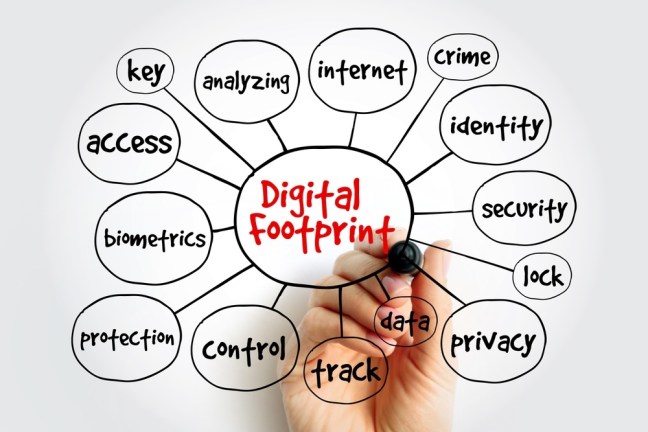
A digital footprint is the trail of data that people leave behind when they use the internet. This includes anything from social media posts and comments to app usage and browsing history. And here’s a key fact that might surprise some students (and adults!): even deleted content doesn’t always disappear entirely. In fact, many platforms store information in backups or archives, making it retrievable long after it’s been “deleted.” This makes it vital for students to understand how every click, comment, and share contributes to their digital presence. According to Pew Researchroughly 59% of U.S. teens are concerned about how much of their personal information is available online and 60% of teens feel they have little to no control over the personal information that social media companies collect about them.

However, armed with the right information and skills, kids can navigate the internet and their digital lives wisely and responsibly, particularly when their teachers develop these skills early. Read on for practical tips to support your students in managing their digital footprints thoughtfully.

5 Tips for Teaching K-5 Students to Manage Their Digital Footprints

  1. Keep it Simple – Use simple, straightforward language to explain that anything posted online can be seen by others, even if it’s deleted.
  2. Role-Playing – Encourage students to practice thinking before they post by using role-playing scenarios where they consider how different online posts might impact them later.
  3. Private vs. Public – Teach students to differentiate between private and public information. Using examples, show what should stay private (like addresses) and what’s safe to share.
  4. Use Real-Life Examples – Show news stories or kid-friendly examples of how a person’s digital actions have had long-term consequences, making the concept relatable and real.
  5. Encourage Mindful Sharing – Teach students to pause before sharing any personal content or comments. Ask them to think about how they would feel if it was shared with everyone, including strangers. Identify unique risks to thoughtlessly sharing content on social media – cause rapid spread of misinformation, damage your reputation, cause social or legal issues, and become a permanent part of your digital footprint.

Teaching young students to manage their digital footprints is about instilling the habit of mindfulness early on, helping them recognize that what they share can last a lifetime. Taito Learning provides many resources that support educators in fostering these skills in young learners.

How Digital Citizenship Curriculum Can Help

Taito Learning offers a range of K-5 digital citizenship resources, specifically designed to teach students about the importance of managing their digital footprints. These include:

  1. Interactive Lessons – We prioritize age-appropriate lessons that break down complex topics like digital footprints into simple, engaging activities. Try this activity from our Digital Citizenship Curriculum: Have students write, draw, or cut out from magazines their own fictional digital footprint on paper. The footprint should include images or names of the apps they use online (e.g., apps for watching videos, sending messages, posting pictures). While discussing and examining their creations, students will talk about the types of traces these activities can leave about them on the internet.
  2. Gamified Learning –Researchers have found time and again that students are both more engaged and more successful when participating in gamified learning, as compared to more traditional methods. Our Digital Citizenship Curriculum was designed to uphold research-based best practices in gamified learning, making it consistently engaging for diverse learners.
  3. Teacher Guides – Most teachers do not receive formal training in digital citizenship education in their pre-service work. Our comprehensive guides take the guesswork out of digital citizenship instruction and help teachers navigate digital citizenship topics, providing step-by-step instructions on how to introduce these concepts to younger students. Lessons and corresponding materials are ready-to-go, saving educators’ valuable time.
  4. Scenario-Based Learning – Role-playing exercises where students make choices and reflect on the potential outcomes, helping them understand the impact of their digital actions. For digital footprint education, use a visual activity where students map out what happens when they post a picture or comment online. Discuss how their actions leave a “digital trail” that others can see, emphasizing responsible choices. For older students, you can have them self-audit their social media profiles. Ask them to identify posts or photos that may not align with their future goals and discuss the importance of curating a positive online image.

Our materials ensure that students not only understand the importance of managing their digital footprints but are also equipped with the skills to do so. Learn more about Taito Learning’s digital citizenship curriculum and how it can support your classroom goals.

Empowering Tomorrow’s Digital Citizens With Taito Learning

Helping students manage their digital footprints is critical to preparing them for a connected world. Early education in digital citizenship ensures young learners understand that their online actions can have long-term effects, reinforcing the importance of thoughtful sharing and privacy.

At Taito Learning, we’re passionate about equipping educators with the tools and resources to nurture mindful, responsible digital citizens. We know educators are incredibly busy, which is why our resources are designed to be easily implementable and ready-to-go for immediate classroom instruction. Our comprehensive K-5 digital citizenship curriculum offers interactive lessons and practical guides designed to teach students the value of managing their online presence from an early age.

10 Critical Skills to Include in Your Digital Citizenship Curriculum

Why Digital Citizenship is Critical for K-12 Learners

In today’s digital-first world, students are navigating more online spaces than ever before. From social media to educational platforms, K-12 learners are growing up in an environment where the lines between real and digital life are often blurred. This makes digital citizenship education not just important but essential. Teaching students how to behave responsibly online, protect their privacy, and critically evaluate information ensures that they become not only skilled digital users but also ethical contributors to the digital world.

Building a comprehensive digital citizenship curriculum equips students with the future-ready skills they need to thrive in an interconnected society. This blog will explore the 10 critical skills every digital citizenship curriculum should include, offering actionable strategies for educators to implement these lessons in their classrooms. Backed by research and practical tips, you’ll discover how to build a generation of mindful, safe, and responsible digital citizens.

Skill #1: Protecting Personal Information and Privacy

According to the Pew Research Center, 59% of teens have been approached by strangers online, highlighting the importance of teaching students privacy management early on. Teaching students to protect their personal information online is fundamental to their safety and privacy. When students understand how to create strong passwords and recognize the risks of sharing sensitive data, they are better equipped to avoid identity theft, hacking, and other privacy breaches. Research shows that early exposure to online safety concepts significantly reduces the likelihood of risky online behavior in adolescence.

Actionable Tips for Educators: 

  • Grades K-5 Tip: Introduce the concept of personal information with a simple activity. Have students list what information should not be shared online (e.g., home address, phone number).
  • Grades 6-12 Tip: Hold a workshop where students assess their digital privacy settings on social media platforms. Discuss the consequences of oversharing and how to control personal data. Use real-world examples of data breaches to illustrate the risks.

Skill #2: Navigating Online Security Threats

Online threats like phishing, malware, and hacking attempts can target users of all ages. Students, especially younger ones, are often unaware of the warning signs of cyberattacks. Teaching them how to identify and avoid these threats reduces their vulnerability and promotes a safer online environment.

Actionable Tips for Educators:

  • Grades K-5 Tip: Use a story-based approach where characters encounter “bad actors” online, like phishing emails. Walk through scenarios where students identify unsafe links or suspicious behavior.
  • Grades 6-12 Tip: Engage students in a cybersecurity simulation where they identify and report phishing emails. Use a “what would you do?” scenario where students navigate phishing attempts and malware threats, applying what they’ve learned.

Skill #3: Promoting Positive “Netiquette”

Understanding digital etiquette, or “netiquette,” is essential for students to engage respectfully and constructively online. In a world where digital communication is the norm, students need to be equipped with skills to express themselves clearly and kindly. Studies show that students who practice positive netiquette are more likely to succeed in digital collaboration and avoid conflicts in online environments.

Actionable Tips for Educators: 

  • Grades K-5 Tip: Start with a class discussion about kind language. Have students create their own “Netiquette Rules” poster that outlines positive online behaviors (e.g., no name-calling, use polite language). 
  • Grades 6-12 Tip: Implement a “Netiquette Challenge” where students review and rewrite social media posts to make them more respectful and constructive. Discuss the impact of tone and word choice in digital communication, especially in written formats where meaning can be easily misconstrued.

Skill #4: Preventing and Addressing Cyberbullying

Cyberbullying is one of the most significant issues students face in digital spaces. In fact, one in three teens have experienced cyberbullying. Without explicit guidance, students may not recognize harmful behaviors or know how to respond when they encounter online harassment. Teaching students to identify, prevent, and report cyberbullying is critical to creating a safe and supportive online environment. Studies show that schools that implement anti-cyberbullying programs see a 20% reduction in online bullying incidents.

Actionable Tips for Educators: 

  • Grades K-5 Tip: Introduce cyberbullying through storytelling. Create a scenario where a character faces online harassment and walk through steps for resolving the situation, such as telling a trusted adult and blocking the bully. Reinforce the importance of empathy and kindness online. 
  • Grades 6-12 Tip: Organize a classroom discussion where students analyze real-world examples of cyberbullying. Encourage students to brainstorm ways to intervene as bystanders or victims. Use tools like StopBullying.gov to introduce reporting methods and prevention strategies.

Skill #5: Managing Digital Footprints

Every online action contributes to a student’s digital footprint, which can have long-term consequences for their personal and professional life. Teaching students to be mindful of their online behavior ensures that they create a positive digital reputation. Research shows that 70% of employers screen candidates based on their digital presence, even for entry-level positions. Further, 54% of employers have decided not to hire a candidate due to something they found in their digital footprint.

Actionable Tips for Educators:

  • Grades K-5 Tip: Use a visual activity where students map out what happens when they post a picture or comment online. Discuss how their actions leave a “digital trail” that others can see, emphasizing responsible choices. 
  • Grades 6-12 Tip: Have students conduct a self-audit of their social media profiles. They should identify posts or photos that may not align with their future goals and discuss the importance of curating a positive online image.

Skill #6: Effective Digital Communication

The ability to communicate effectively in digital spaces is essential for students to succeed both academically and professionally. From email etiquette to managing tone in text-based communication, students must learn how to convey their ideas clearly while being mindful of their audience. A recent study suggests that students who receive explicit instruction in digital communication outperform peers in online collaboration and conflict resolution.

Actionable Tips for Educators:

  • Grades K-5 Tip: Teach students about respectful online communication by practicing writing simple, kind messages to one another. Use an email or messaging platform to simulate appropriate digital interactions. 
  • Grades 6-12 Tip: Host a role-playing exercise where students draft and revise professional emails or discussion posts. Discuss how tone, structure, and formality change based on the audience and platform, helping them adjust their communication accordingly.

Skill #7: Developing Critical Thinking to Evaluate Online Information

In an age of misinformation, teaching students to think critically about the content they encounter online is a crucial skill. Students need to know how to differentiate between credible sources and misinformation, which will help them make informed decisions. Research from Stanford University found that 80% of middle school students were unable to distinguish between sponsored content and factual news stories, highlighting the need for digital literacy education.

Actionable Tips for Educators: 

  • Grades K-5 Tip: Start with a basic lesson on identifying trustworthy websites. Create a checklist of things to look for, like “Is the author an expert?” or “Are there too many ads?” Have students apply this checklist to age-appropriate websites. 
  • Grades 6-12 Tip: Organize a “fact-checking” workshop where students analyze news articles and social media posts to determine if they are credible. Encourage them to use fact-checking websites like Snopes or FactCheck.org to verify information.

Skill #8: Identifying Reliable Sources of Information

With the overwhelming amount of information online, students must learn how to differentiate between reliable and unreliable sources. Teaching students to identify trustworthy information is essential for developing informed citizens who can navigate online spaces critically. Research shows that only 25% of high school students can correctly evaluate the credibility of online sources, underscoring the importance of this skill.

Actionable Tips for Educators: 

  • Grades K-5 Tip: Introduce the concept of trustworthy sources by comparing fictional and nonfictional stories. Show students how certain websites, like government or educational sites, are more reliable for learning facts. 
  • Grades 6-12 Tip: Lead a research project where students investigate a current event using multiple sources. They should rate the reliability of each source, using a checklist that includes author credentials, publication reputation, and evidence backing the claims.

Skill #9: Understanding the Impact of Technology on Society

Technology affects every aspect of society—from education and politics to healthcare and the environment. Students need to understand how technology shapes societal norms, policies, and global interactions. Developing an awareness of this impact helps them become more informed and responsible digital citizens. According to Pew Research Center, 89% of teens report that technology has changed the way they interact with the world, emphasizing its societal influence.

Actionable Tips for Educators: 

  • Grades K-5 Tip: Hold a class discussion about the ways students use technology every day and how it impacts their lives. Have them draw or write about the ways they think technology can help or hurt their communities. 
  • Grades 6-12 Tip: Assign a project where students research how a specific technology (like social media or AI) has impacted a particular field (education, medicine, or government). Students can present findings on both the positive and negative consequences of technological advancements.

Skill #10: Learning the Basics of Artificial Intelligence (AI)

Artificial intelligence (AI) is becoming a major part of the digital landscape, and students need to understand how AI works and its potential applications. Teaching the basics of AI helps students become not only users of technology but also informed individuals who can critically engage with AI-related developments. A 2022 study found that AI will play a major role in 75% of future job opportunities, making it a necessary topic in education.

Actionable Tips for Educators: 

  • Grades K-5 Tip: Introduce AI through storytelling by explaining how voice assistants like Alexa or Siri work. Then, have students brainstorm other ways AI helps people in their everyday lives. 
  • Grades 6-12 Tip: Lead a hands-on coding activity using an AI tool like Scratch or Google’s Teachable Machine. Discuss the ethical implications of AI, including privacy concerns and the potential for bias.

Building Future-Ready Digital Citizens

Equipping today’s students with the skills they need to become responsible, informed digital citizens is more critical than ever. From understanding online privacy to navigating the complexities of AI, students must be prepared to engage with technology in ways that are safe, ethical, and impactful. By incorporating these 10 essential skills into your digital citizenship curriculum, you’re not just teaching students how to use technology—you’re empowering them to thrive in an interconnected world.

Whether you’re working with K-5 learners or secondary students, these skills can be tailored to any age group, ensuring that all students are ready to meet the challenges and opportunities of the digital age. Explore more about Taito Learning’s digital citizenship curriculum to see how our resources can help you create future-ready learners.